Suddenly being a tattle-tale is cool

tattletale-imageRecently, a friend and fellow Microsoft enthusiast, Robert McLaws, had gone to an AT&T store to check out Windows Phone. Much to his dismay, the demo unit was in a location out of sight and wasn’t even plugged in. When he spoke with a sales rep, that individual tried talking him out of Windows Phone and into Android.

Not happy with this, McLaws began to talk with different people only to find out that they were having the same type of experience. He decided that there needed to be a way for people to share their experiences in hopes of Microsoft and the mobile carriers taking notice.

He created Windows Phone Tattletale, a website where people can post what happened to them when they inquired about Windows Phone from their carrier or nearest reseller.

As a proponent of Windows Phone myself, I think having a website like this can be a great catalyst for change. Already Microsoft has admitted to retail sales not being in good shape and goes on to use the excuse that things should improve when Nokia begins selling Windows Phone. Their statement makes me want to say, “Shame on you Microsoft. Shame on you. You’re doing your current partners and potential customers a disservice by saying that things won’t improve until Nokia joins the party.”

When it comes to the success or failure of Windows Phone, there is a shared responsibility. Microsoft, the mobile carriers, the hardware partners, and the independent retailers all play a role. Microsoft needs to improve its efforts to get people past the stigma of a) “Windows” (people hear it and think Windows running on a phone), b) the Kin disaster, and c) Windows Mobile. The mobile carriers need do to more to train their direct sales people on Windows Phone and provide better marketing and visibility of the platform. The hardware partners need to do better quality assurance on their hardware (see Samsung Focus), and the independent retailers need to provide better training for their employees.

If you’ve had an experience (good or bad) at retail with Windows Phone, I strongly recommend you share it over at Windows Phone Tattletale. The more data that can be gathered the better, I say.

Imagine Cup 2011–Team Software4Life (Spain)

249502_206573872718262_206572472718402_578592_6745342_n

Earlier this week, I introduced you to the first of five teams competing in the 2011 Microsoft Imagine Cup, Team Note-Taker. Today, I’m going to introduce you to Team Software4Life from Spain.

Team Software4Life is made up of Cristian, team mentor, and Luis, Pedro, Cesar, and Gonzalo. Their project is called WaterSense, and the goal is to streamline the availability of drinking water. Why is a project like this needed, you ask? In some areas of the world, drinking water is not as plentiful as it is in developed nations.

Team photoWaterSense aims to change this with their 3-part solution. The first part is WaterSense Mobile. This is a tool designed to be used by volunteers in developing countries to identify potential water shortages. The second component is WaterSense NGO. This is what is used by NGOs to examine and analyze the data collected by volunteers through WaterSense Mobile. The final piece is a social component called WaterSense FB. This component lives on Facebook and enables users to see where projects are going on and enables users to donate and track where their donations are going.

This is one project that I am incredibly curious to see in person. Water is an absolute necessity for life, and I believe that any project that can bring clean drinking water to those who need it is worthy of praise.

For more on WaterSense, I strongly encourage you to visit their Facebook page, YouTube channel, and stay tuned here for more from New York City.

Imagine Cup 2011–Team Note-Taker (USA)

Imagine-Cup-2011

The Worldwide Finals of the 2011 Imagine Cup by Microsoft will be upon us in about three weeks. Over these next few weeks, I’ll be introducing you to some select teams that will be competing July 8th-13th in New York City.

Today, I’ll be introducing Team Note-Taker. Team Note-Taker is based out of the Center for Cognitive Ubiquitous Computing (CUbiC) at Arizona State University.

Led by team leader David Hayden and Mentor John Black,5607507820_f581754579_z along with Shashank Srinivas, Michael Astrauskas, and Qian Yan, Team Note-Taker has created a portable assistive device consisting of a robotic camera, a tablet PC, and Microsoft OneNote 2010.

Inspiration for this project comes from David Hayden who is legally blind and decided he was not going to let his blindness get in the way of pursuing a dual degree in both Computer Science and Mathematics.

notetaker-prototypesThe Note-Taker presents its users with a split-screen view of live video from the camera and a Microsoft OneNote notebook. By using gestures (pinch to zoom, tap to focus, etc.) users can control the camera and take notes at the same time.

By using a solution such as the Note-Taker, students who are vision impaired can reduce the time and struggle in keeping up with their sighted peers in classes.

The Note-Taker is an innovative approach combining software and hardware in an easy to use way and at an affordable price point.

Team Note-Taker took first place in the Software Design category of the US Imagine Cup finals. Will they take it all the way in New York City? Stay tuned right here to find out!

(All images property of their respective owners. Imagine Cup logo, property Microsoft Corporation, Team Note-Taker photo, property Microsoft Corporation, Note-Taker prototypes photo, property Wired.)

Windows MultiPoint Server 2011 | Part 2: Installation

In Part 1 of this series, I introduced you to Windows MultiPoint Server 2011. Today, in Part 2, I’ll show you just how easy it is to get setup with MultiPoint Server 2011.

System Requirements (minimum)

  • 2 GHz 64-bit processor with at least two cores
  • 2 GB RAM
  • 32GB Hard Drive space
  • DVD Drive for installation

For more on system requirements, I recommend reviewing the Windows MultiPoint Server 2011 Planning Guide.

Installation

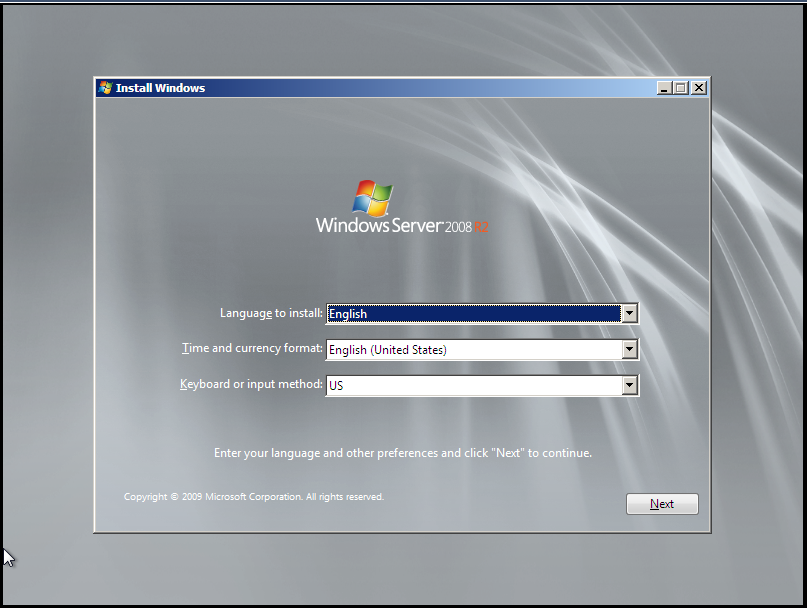
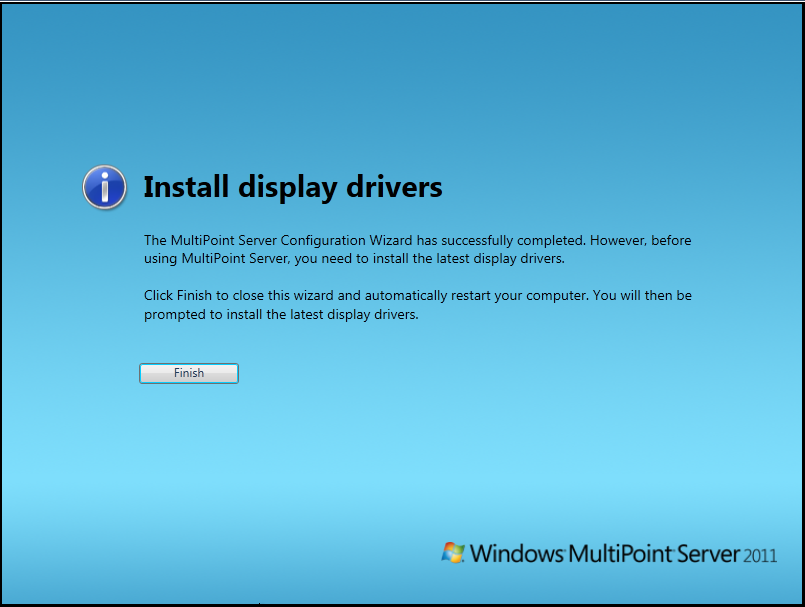
The initial setup for MultiPoint Server 2011 is straight forward. Starts out with the ever familiar Windows 7 / Server 2008 R2 setup process and then leads into a customized Out-of-Box Experience (OOBE) for MultiPoint Server 2011.

Step1Step2Step3Step1Step2Step3Step4Step5

Post-Install

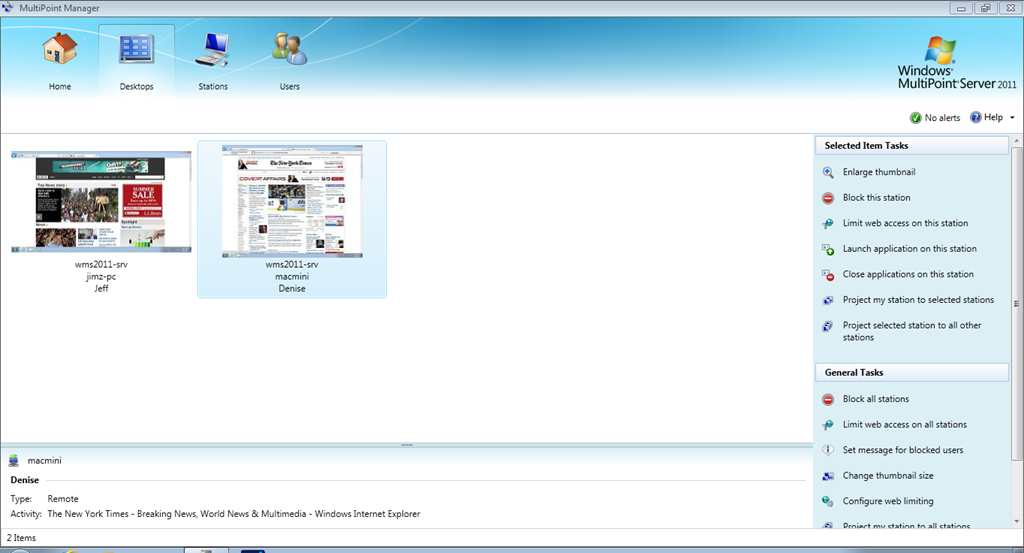
After installation and OOBE have completed, display drivers need to be installed as well as any other drivers necessary for the proper function of the MultiPoint Server. After drivers and Windows Updates were installed, I rebooted and was greeted by the MultiPoint Manager. MultiPoint Manager is the central console for managing any and all MultiPoint servers on the network.

HomeTabDesktopsTabStationsTabUsersTab

In part 3, we’ll take a deeper look at MultiPoint Manager.

Windows MultiPoint Server 2011 | Part 1: Introduction

Windows MultiPoint Server 2011 is an awesome product from Microsoft. MultiPoint Server is designed as a solution to provide what I’ll call “one-to-many” or “shared” computing. By “one-to-many” I mean that MultiPoint Server runs on one server and provides the computing power for up to 20 users at the same time.

What are some of the possible usage scenarios? With the ever shrinking education budgets here in the United States, schools are having to find new ways to do more with less. Instead of buying a lab full of workstations, schools can buy MultiPoint Server and thin client hardware at a fraction of the cost. Another example is a small business looking to keep their costs low, can deploy MultiPoint and thin clients to all their employees. The possibilities are endless.

I’ve included below a slide listing the cost of MultiPoint Server. Note that this is for the software only and does not include server hardware or client hardware and is based on Volume License channel pricing.

WMS2011_Pricing

In Part 2, I’ll walkthrough the initial installation and setup of MultiPoint Server 2011.

DataCore DriveHarmony now available in Beta

Today, DataCore has released a beta of their DriveHarmony software for Windows Home Server 2011.

This beta release will expire after 30 days, and is NOT meant for production use. DO NOT use production data with this release.

I’m downloading right now and will have more later. If you want to download the beta, click the link below.

Pro tip–The one where cfg.ini would not be recognized

Figured I’d post this in case anyone else runs into this issue. I was performing an unattended install of Windows Home Server 2011 and the setup failed. I tried to use the same cfg.ini file again, however, setup didn’t like the file the second time around. Knowing that I hadn’t changed anything, I opened the file and noticed something strange. There was an additional line that Setup adds to the file once its used it.

The line added is located in the [WinPE] section and is called Processed=true.

In my testing, removing this line will allow the cfg.ini file to be used again.

image     image

                          Before setup runs                                       After setup runs

This tip applies to:

  • Windows Home Server 2011
  • Windows Small Business Server 2011 Essentials
  • Windows Storage Server 2008 R2 Essentials

Online help resources for WHS 2011 / SBSe 2011 / Storage Server R2 Essentials

This one’s a short post. Here are the direct links to the online help sites for Windows Home Server 2011, Small Business Server 2011, and Storage Server R2 Essentials.

Windows Home Server 2011 – http://onlinehelp.microsoft.com/en-us/windowshomeserver2011

Small Business Server 2011 Essentials – http://onlinehelp.microsoft.com/en-us/sbs2011essentials/

Storage Server 2008 R2 Essentials – http://onlinehelp.microsoft.com/en-us/storageserver2008r2/

Why you should consider Windows Phone

In talking to different people about why they should own a Windows Phone, I did some research and have found that no one has written a post on this topic.
First, however, I want to clear up some common misconceptions that I hear in the marketplace.

    1. Windows Phone is NOT Windows Mobile. These are two completely different mobile operating systems, and Windows Phone has been redesigned from the ground up.
    2. Windows Phone can’t be any good because it doesn’t have as many apps as iPhone or Android. If you’re rating an entire platform solely based on the number of apps in its marketplace, you’re doing it wrong. All the platforms have really good apps and all the platforms have those apps that are full of epic fail.
    3. Don’t pay attention to what the sales reps at the carriers say. They don’t know of which they speak. I visited 10 T-Mobile, AT&T, and Verizon stores here in Phoenix, and only one guy from one carrier even knew what Windows Phone was and knew correct factual information about it.

Second, set aside all preconceived notions about a) Windows Phone and b) Microsoft.

Alright, now that the disclaimers are out of the way, let’s move on to the fun stuff.

Peoplehub_US_webSo, what is Windows Phone 7? Here’s the answer. Windows Phone 7 is Microsoft’s new mobile operating system. Redesigned from the ground up with all new features and an innovative user interface, Windows Phone 7 is the newest entry in the ever expanding smartphone market.

Windows Phone 7 features a UI called “Metro.” Metro is designed to be a glance and go interface. By bringing the information that matters the most (unread emails, missed calls, unread text messages) to the forefront, users don’t have to spend a lot of time searching for information. A key part of Metro, is Live Tiles. Live Tiles take the tile for an application on the home screen and provide always update information. Some examples of this usage are The Weather Channel app which provides the current temperature on its tile and Beezz which will show you the number of unread tweets in your timeline. If you really want to dive in and learn more about Metro, I highly recommend reading Microsoft’s UI Design and Interaction Guide for Windows Phone 7 document. It goes into a lot of detail about what Metro is.

What sets Windows Phone 7 apart from the pack are its features. Let’s look at those now.

  • Zune integration – Every Windows Phone is a Zune and has the ability to connect to Microsoft’s Zune Pass service. Unlimited music across your phone (on Wi-Fi and 3G), your computer, and Xbox 360. How cool is that?
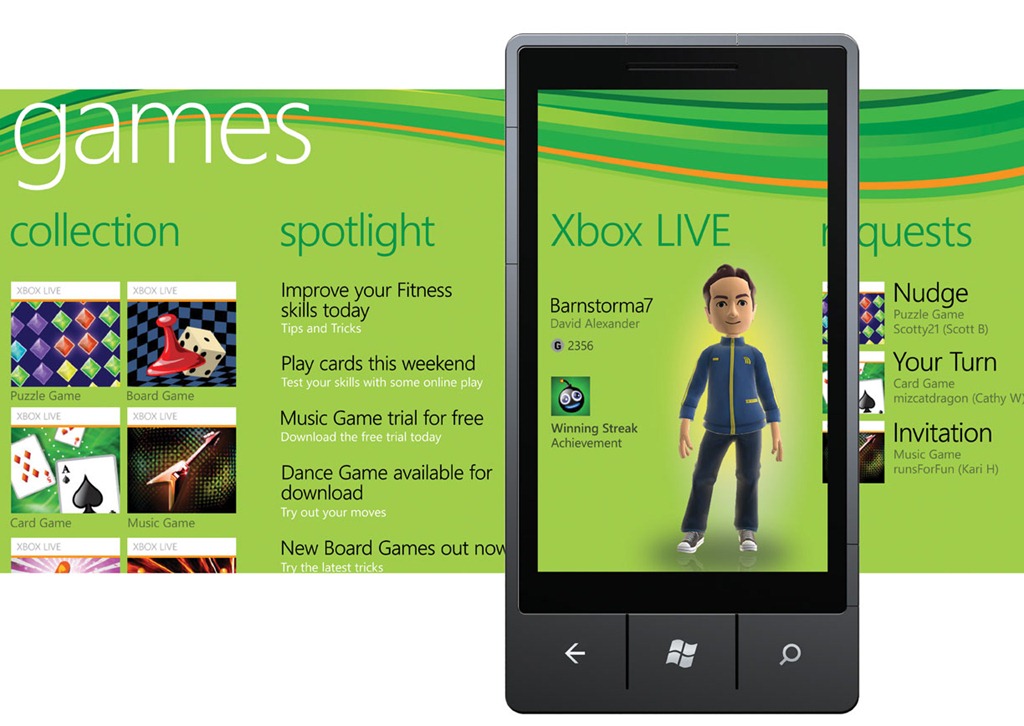
  • Xbox Live integration – Many games available for Windows Phone tie into Xbox Live. ThisGameshub_US_web means that things like achievements, avatars, leaderboards, messaging and more are available directly in Windows Phone.
  • Cloud integration – Windows Phone integrates with Facebook, Google, Windows Live services like Hotmail and SkyDrive, and coming in the fall is integration with Facebook chat, Windows Live Messenger and Twitter. Contacts are automatically synced to Windows Live or Google, and pictures can be sent to SkyDrive as they are being taken.
  • Bing integration – Every Windows Phone is required to have a dedicated search button. This search button connects to Bing and provides an awesome search experience. Using the built-in GPS, Bing provides local search and can then provide driving directions to your destination. Bing also provides web and news searches as well.
  • Office integration – Windows Phone features native Office integration. Word, Excel, Powerpoint, OneNote, and Outlook are all available on Windows Phone. This provides native support for viewing and editing documents, spreadsheets, and presentations on the go. For those in enterprise environments, access to SharePoint document libraries is also integrated.
  • Voice Search – With Windows Phone, you can use voice search commands to call someone, locate a business in your neighborhood, or open applications. My favorite part about this is that when you want to locate a business in neighborhood all you have to say is “Find a McDonalds in Phoenix” and it will open Bing directly to the local pane and show a map of the McDonalds near you. It’s quick, it’s easy, it’s simple.

Microsoft has done a lot of things right with Windows Phone 7. They’ve provided deep rich integration with the services we all use on a daily basis, designed an innovative user experience, and with today’s announcement of what is coming in the next release of Windows Phone (available for all Windows Phone devices), have upped their game even further.

I strongly recommend that you visit your local cell phone provider and get hands on with a Windows Phone.

More Information:

Microsoft’s Windows Phone website – http://www.windowsphone.com

Review: HTC Surround

Introduction

The HTC Surround, introduced November 9th, 2010, is a Windows Phone 7 device for AT&T (US) and Telus (Canada). The device features 16GB of internal storage and is powered by a 1 GHz Qualcomm QSD8250 processor along with 448MB of RAM. A key differentiator for this device is the speakers powered by Dolby mobile technology and SRS. For photos and videos the device features a 5MP camera and the ability to record video at 720p.

Hardware

The Surround is in my opinion, one stout phone. Weighing in at about 6 ounces, the phone doesn’t feel like it would fly out of your hand, but it is also not so heavy that it becomes a burden to hold to your ear while talking. The slide mechanism to uncover the speakers is not flimsy, but fairly tight. I haven’t used the phone long enough to determine if the slide weakens over time, but overall I’d say that the hardware itself is pretty solid. Because this phone is called the “Surround” I had to test the speakers. In my opinion, they aren’t the greatest mobile phone speakers. They are definitely louder than the ones on my HTC HD7, but the sound enhancements seem very gimmicky. If you are only considering buying this phone for the speakers, you’ll be disappointed. For video and camera quality, I was pleasantly surprised. The camera takes decent pictures, and for recording video, the quality is as good as it can be at 720p.

Software

The Surround runs Windows Phone 7, and comes stock with the original (what I call 1.0) release of the operating system. At this point, AT&T has approved the “NoDo” (Copy and Paste) update for the device, so updating the software through Zune was not an issue. For this particular device, there was an included update from HTC for the device as well, but no details were provided on what it fixes. For running Windows Phone 7, performance was very sub-par. Many times, the device would lag when a phone call was received and I had to pull the battery and reboot several times in my week of testing. I was around a few others who have also just received HTC Surrounds who were seeing these same issues. Because of this, I’m inclined to believe that the device is underpowered at 448MB. Other than these issues, the OS and apps installed on the device performed as expected with some lag due to the small amount of memory in the device.

Network

In the interest of full disclosure, the device is designed for the AT&T network, but I SIM unlocked it for use on T-Mobile, so I was limited to the EDGE network, so I can’t accurately test the performance of the phone on a 3G network. However, call quality was very clear and very loud. I had no issues hearing what callers were saying and they had no issues hearing what I was saying.

Conclusion

In my opinion, the HTC Surround is fairly decent phone. However, it is does have issues. The biggest issue that I’ve experienced is the lack of performance with the OS. The freezing and the constant lock ups make the device near unusable. For being advertised as a phone with Dolby and SRS technology behind the speakers, it’s a gimmick. Sure, the speakers don’t sound tinny, but watching a movie from Netflix on the device won’t be a magical and memorable experience. I liked the photo and video quality of the Surround, which is a major plus. I like the overall size of the device. It’s not too big, not too small, it’s just right. If HTC, Microsoft, and AT&T can all work together to solve the performance issues, I see the Surround as a great device in the Windows Phone lineup.

My rating

I give the HTC Surround 3 out of 5 stars. I like Windows Phone 7, the size and weight of the device, and the photo / video quality. The speakers are too much of a gimmick and the performance issues are a concern.

Photos

Technical Specs (as tested)

Connectivity

GSM850/900/1800/1900 MHz

Weight

6 oz.

Dimensions

4.72″ x 2.44″ x 0.54″

Battery Life

Talk: 4 hours / Standby: 264 hours

Display

3.8” LCD – 480x800px

OS

Windows Phone 7 (updated to NoDo through Zune software)

Storage

16GB internal microSD storage

RAM

448MB