Taking a bite out of the Big Apple

I’ve arrived in New York City for the 2011 Microsoft Imagine Cup. For those of you just joining us, the Microsoft Imagine Cup is the premier student technology competition. I tend to tell people that it’s the Olympics of technology.

At the Imagine Cup, the top students from around the world come together to compete against each other in categories such as Software Design, Game Design, Embedded Development, and the Windows Phone 7 challenge just to name a few.

I’ll be here covering five teams and their progress throughout the Worldwide Finals. My teams are as follows:

The Imagine Cup Worldwide Finals begin this Friday, July 8th and end Wednesday, July 13th.

For more on Imagine Cup please visit www.imaginecup.com, or search for #ImagineCup on Twitter. You can also follow me on Twitter, @tziegmann, to follow along this week as well.

Microsoft Office 365: First Impressions

ofc365_h_webYesterday in New York City, Steve Ballmer announced the general availability of Microsoft Office 365.

Office 365 is the long-awaited successor to Business Productivity Online Services (BPOS). BPOS at the core was Exchange Server 2007 and SharePoint Server 2007 in the cloud. Also included was Office Live Meeting which could be used for hosting conference calls and presentations.

Office 365 in some ways is an evolution of BPOS, but there is so much more to Office 365 that I see it as an entirely new offering. The offerings in Office 365 are much improved from a cloud services architecture standpoint I’ve included a chart below listing the differences between the two products.

Screen shot 2011-06-28 at 9.49.30 PM

With Office 365, collaboration and communication are on a whole other level. By combining Exchange, SharePoint, and Lync in a cloud solution, Microsoft has made it easy for small businesses to have access to enterprise size technologies at a reasonable price and without having to deal with any of the infrastructure, licensing, and personnel overhead.

What do I mean by enterprise size technologies? Let’s take a look.

  • Mail, Contacts, and Calendar powered by Exchange 2010
  • Instant Messaging, Live Meetings, and Audio / Video conferencing powered by Lync 2010
  • Collaborative Team Sites powered by SharePoint 2010

Best part about Office 365 though, is that they have a pricing model to fit everyone’s needs. Starts out at $2/user all the way up to $27/user based on the services provided. For small businesses and individuals, it’s only six bucks a month!

I’m currently in the process of migrating my single person Google Apps account to Office 365 and will then be migrating my personal e-mail over and then I’ll be relying entirely on the cloud. So far so good. The only hitch I have run into is that I signed up as a partner and there is a bit of a lag between account setup and when the actual licenses show up and are available to be used. Not a big deal. Other than that, I strongly recommend that users keep control of their DNS settings and manually set the appropriate Office 365 settings. I’ve seen too many comments in the Office 365 forums about inability to modify when MS Online has control.

Once I start using Office 365 on a daily basis, I’ll post more of my thoughts, but so far, it’s been pain free.

For more on Office 365, visit http://www.office365.com

If by some chance, you’re a small business in Arizona, and want to talk more about Office 365 and how it might fit in your business, send me an e-mail. tom (at) tomontech (dot) com

Imagine Cup 2011–Team Argitech (Spain)

Argitech_Team

As we near the start of the 2011 Imagine Cup World Finals next week, it’s time to introduce the final team in this series.

Please extend a warm welcome to Team Argitech of Spain. The members of Team Argitech are Aitor Akizu Santacruz, Javier Sierra Navarro, Josu Lopex Olivenza, and mentor Xabier Mardaras.

Team Argitech is competing in the Embedded Development category with their project, Smart Light.

Smart Light is a management system for use with public street lighting systems. By gathering real-time data, the lighting grid can dynamic enable or disable lighting based on need. The premise of the system is that power consumption can be reduced thereby saving municipalities money.

I’m intrigued by their project, and I’m excited to see it in person and learn more. I see some real potential here.

For more about Team Argitech and Smart Light, stay tuned right here July 8th-13th.

Imagine Cup 2011–Team NeaSoft (Italy)

Raffaele-Sergio-Clemente-MartaToday, I’d like to introduce you to Team NeaSoft from Italy, and their project OMCR.

Team NeaSoft hails from Naples, Italy, and their team name means “New Software.” (Nea meaning “new” in Greek.) The team is lead by Clemente Giorio, a current Microsoft Student Partner, and is joined by Raffaele Galiero, Marta Ponari, and mentor Sergio Di Martino. Clemente and Raffaele are students at Università degli Studi di Napoli Federico II, and Marta is a student at Seconda Università degli Studi di Napoli.

With over 16 million people in the European Union suffering from motor disabilities, Team NeaSoft is working to bridge the digital divide to enable these individuals to communicate, learn, and be entertained.

OMCR (Oculorum Moto Computer Regere) aims to be a tool of expression for those with disabilities. Team NeaSoft is aiming to simplify the computing experience for those that currently do not have the ability to use a computer.

For more on Team NeaSoft, stay tuned here, July 8th-13th, and join them on Facebook to keep up-to-date.

Imagine Cup 2011–IT Challenge–Sinescu Ionut (Romania)

Ionut SinescuOne of the best things about the Microsoft Imagine Cup is the variety of competition categories that span all of Microsoft’s technologies. One such category is the IT Challenge.

The IT Challenge tests competitor’s skills and knowledge about everything IT. Competitors are given a case study on an organization and have to write a document telling the judges exactly how they would meet this organization’s needs. If they do well and move on to the final round, the competition heats up.

From the Microsoft Imagine Cup website:

“This lab will challenge you to build servers, server images, and configurations on a Hyper-V host server to prove your practical knowledge and experience with the technologies.  You will be asked to setup, install, and demonstrate knowledge and expertise around Windows 2008 R2, Exchange 2010, Windows 7, Office 2010, System Center Configuration Manager 2007 R2, System Center Operations Manager 2007 R2, TMG 2010, SQL 2008 R2, Office Communications Server 2007 R2, etc. You will be given 24 hours to complete the hands-on lab challenge.” 

One such competitor is Sinescu Ionut, a student at Alexandru Ioan Cuza University in Romania. Sinescu will be competing against five other students in what Sincescu calls “a one man show” of information technology excellence.

For more on Sinescu, feel free to check out his blog (in Romanian), or visit him on Facebook.

Suddenly being a tattle-tale is cool

tattletale-imageRecently, a friend and fellow Microsoft enthusiast, Robert McLaws, had gone to an AT&T store to check out Windows Phone. Much to his dismay, the demo unit was in a location out of sight and wasn’t even plugged in. When he spoke with a sales rep, that individual tried talking him out of Windows Phone and into Android.

Not happy with this, McLaws began to talk with different people only to find out that they were having the same type of experience. He decided that there needed to be a way for people to share their experiences in hopes of Microsoft and the mobile carriers taking notice.

He created Windows Phone Tattletale, a website where people can post what happened to them when they inquired about Windows Phone from their carrier or nearest reseller.

As a proponent of Windows Phone myself, I think having a website like this can be a great catalyst for change. Already Microsoft has admitted to retail sales not being in good shape and goes on to use the excuse that things should improve when Nokia begins selling Windows Phone. Their statement makes me want to say, “Shame on you Microsoft. Shame on you. You’re doing your current partners and potential customers a disservice by saying that things won’t improve until Nokia joins the party.”

When it comes to the success or failure of Windows Phone, there is a shared responsibility. Microsoft, the mobile carriers, the hardware partners, and the independent retailers all play a role. Microsoft needs to improve its efforts to get people past the stigma of a) “Windows” (people hear it and think Windows running on a phone), b) the Kin disaster, and c) Windows Mobile. The mobile carriers need do to more to train their direct sales people on Windows Phone and provide better marketing and visibility of the platform. The hardware partners need to do better quality assurance on their hardware (see Samsung Focus), and the independent retailers need to provide better training for their employees.

If you’ve had an experience (good or bad) at retail with Windows Phone, I strongly recommend you share it over at Windows Phone Tattletale. The more data that can be gathered the better, I say.

Imagine Cup 2011–Team Software4Life (Spain)

249502_206573872718262_206572472718402_578592_6745342_n

Earlier this week, I introduced you to the first of five teams competing in the 2011 Microsoft Imagine Cup, Team Note-Taker. Today, I’m going to introduce you to Team Software4Life from Spain.

Team Software4Life is made up of Cristian, team mentor, and Luis, Pedro, Cesar, and Gonzalo. Their project is called WaterSense, and the goal is to streamline the availability of drinking water. Why is a project like this needed, you ask? In some areas of the world, drinking water is not as plentiful as it is in developed nations.

Team photoWaterSense aims to change this with their 3-part solution. The first part is WaterSense Mobile. This is a tool designed to be used by volunteers in developing countries to identify potential water shortages. The second component is WaterSense NGO. This is what is used by NGOs to examine and analyze the data collected by volunteers through WaterSense Mobile. The final piece is a social component called WaterSense FB. This component lives on Facebook and enables users to see where projects are going on and enables users to donate and track where their donations are going.

This is one project that I am incredibly curious to see in person. Water is an absolute necessity for life, and I believe that any project that can bring clean drinking water to those who need it is worthy of praise.

For more on WaterSense, I strongly encourage you to visit their Facebook page, YouTube channel, and stay tuned here for more from New York City.

Windows MultiPoint Server 2011 | Part 2: Installation

In Part 1 of this series, I introduced you to Windows MultiPoint Server 2011. Today, in Part 2, I’ll show you just how easy it is to get setup with MultiPoint Server 2011.

System Requirements (minimum)

  • 2 GHz 64-bit processor with at least two cores
  • 2 GB RAM
  • 32GB Hard Drive space
  • DVD Drive for installation

For more on system requirements, I recommend reviewing the Windows MultiPoint Server 2011 Planning Guide.

Installation

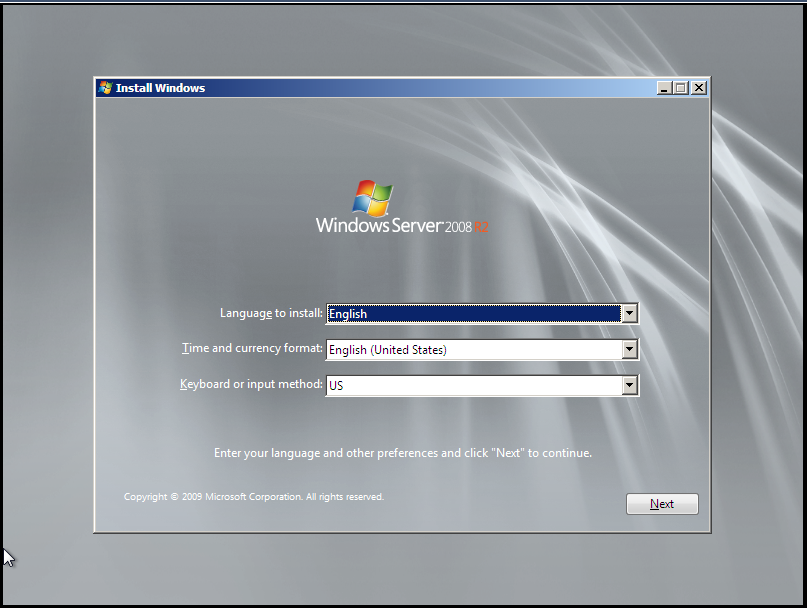
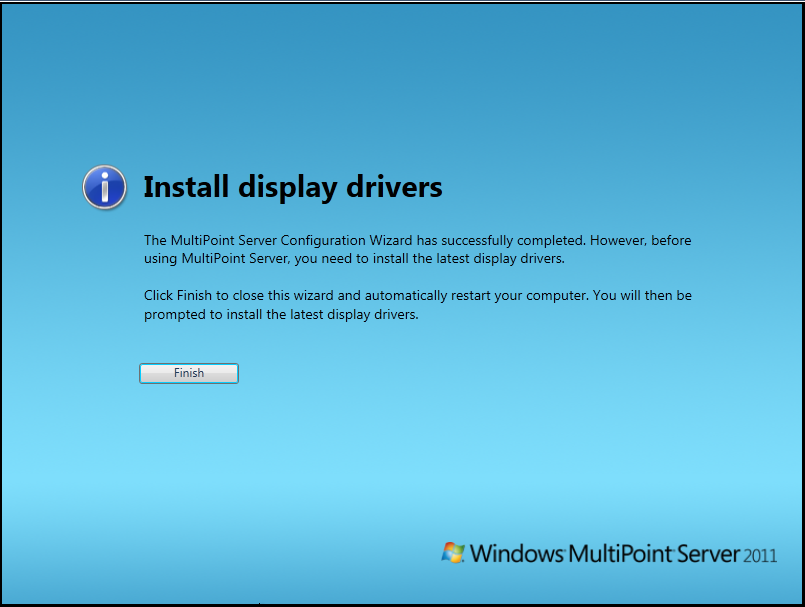
The initial setup for MultiPoint Server 2011 is straight forward. Starts out with the ever familiar Windows 7 / Server 2008 R2 setup process and then leads into a customized Out-of-Box Experience (OOBE) for MultiPoint Server 2011.

Step1Step2Step3Step1Step2Step3Step4Step5

Post-Install

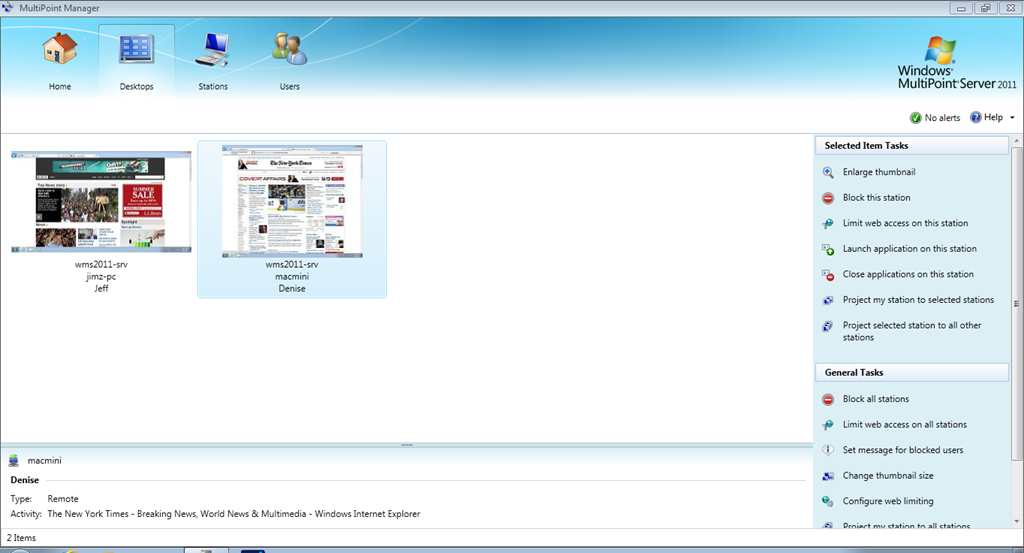
After installation and OOBE have completed, display drivers need to be installed as well as any other drivers necessary for the proper function of the MultiPoint Server. After drivers and Windows Updates were installed, I rebooted and was greeted by the MultiPoint Manager. MultiPoint Manager is the central console for managing any and all MultiPoint servers on the network.

HomeTabDesktopsTabStationsTabUsersTab

In part 3, we’ll take a deeper look at MultiPoint Manager.

Windows MultiPoint Server 2011 | Part 1: Introduction

Windows MultiPoint Server 2011 is an awesome product from Microsoft. MultiPoint Server is designed as a solution to provide what I’ll call “one-to-many” or “shared” computing. By “one-to-many” I mean that MultiPoint Server runs on one server and provides the computing power for up to 20 users at the same time.

What are some of the possible usage scenarios? With the ever shrinking education budgets here in the United States, schools are having to find new ways to do more with less. Instead of buying a lab full of workstations, schools can buy MultiPoint Server and thin client hardware at a fraction of the cost. Another example is a small business looking to keep their costs low, can deploy MultiPoint and thin clients to all their employees. The possibilities are endless.

I’ve included below a slide listing the cost of MultiPoint Server. Note that this is for the software only and does not include server hardware or client hardware and is based on Volume License channel pricing.

WMS2011_Pricing

In Part 2, I’ll walkthrough the initial installation and setup of MultiPoint Server 2011.

DataCore DriveHarmony now available in Beta

Today, DataCore has released a beta of their DriveHarmony software for Windows Home Server 2011.

This beta release will expire after 30 days, and is NOT meant for production use. DO NOT use production data with this release.

I’m downloading right now and will have more later. If you want to download the beta, click the link below.